Undetected Windows Reverse Shell — Live Demo & Mitigations
This is lab style study of a process-injection reverse shell performed in VMs. The focus is explanation and measurement — why certain delivery and runtime techniques can avoid simple static/dynamic checks. I then test it against my Pi Secure Web Gateway to compare endpoint vs. gateway behavior. The VirusTotal scan also does sandbox tests and behavior analysis which will show how the code may be detected.
How it attempts to evade analysis
- Static evasion by obfuscation: The loader contains an encrypted payload rather than plain shellcode or strings that match malware signatures; this prevents simple signature and pattern matching from triggering on download.
- Minimal on-disk footprint: because the active code is reconstructed in memory inside another process, the original file on disk appears small and benign; reputation checks that rely on file hashes or obvious PE characteristics can therefore return “unknown” or “benign.”
- Runtime injection into trusted processes: the loader creates or hijacks a normally-trusted process and writes the payload into the target process memory — the behavior blends into otherwise normal process activity and can defeat simplistic sandbox heuristics that only look for suspicious processes spawning or unusual filenames.
Demo walkthroughs
Short clips showing the payload execution on the Windows victim and the listener session receiving the beacon.
The program is ran with no issues. The code used successfully bypasses Windows Defender. Windows Defender comes with every windows machine by default, and is rarely changed to another anti-virus or used in combination with other defense measures. This shows that there is a huge security issue if one depends on an anti-virus alone. Using the Secure Web Gateway ensures that users do not need to change anything on their machines making it a great choice to defend many machines without even touching them. The Secure Web Gateway is not just limited to Windows or computers but can be used to protect any device that can browse the web.
Testing the Secure Web Gateway
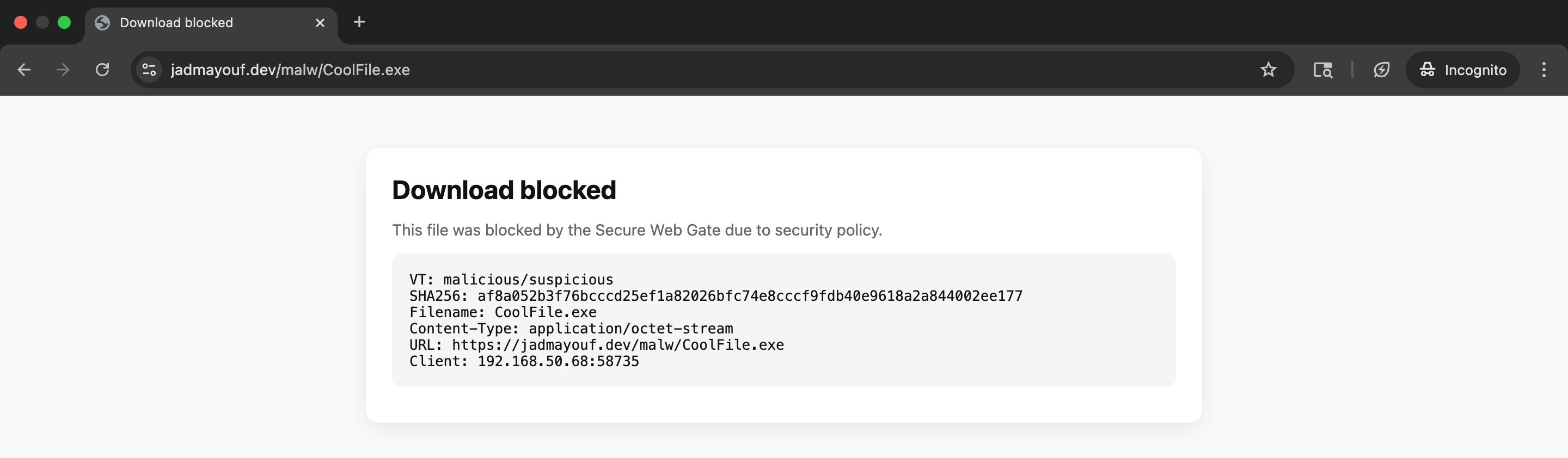
As seen in the Pi Secure Web Gateway project's page, even though it bypasses Windows Defender, the reverse shell does not bypass the SWG.
Mitigations & detections found from Sandbox findings
MITRE ATT&CK mapping
- Execution — Native API: uses native OS APIs to start or manipulate processes. Detection signal: unexpected process creation or processes launched with unusual command-line flags.
- Process Injection / Thread Execution Hijacking : writes into another process’ memory and creates a thread to execute there. Detection signal: WriteProcessMemory + VirtualProtectEx (RW→RX) or CreateRemoteThread in an unusual target process. Correlate these with process ancestry
- Defense Evasion — Timestomp : suspicious compilation timestamp or timestomping of files. Detection signal: PE timestamps in the future or inconsistent build metadata.
- Deobfuscate/Decode Files : base64 decode usage seen in .NET. Detection signal: API calls to Convert::FromBase64String or code that allocates memory then decodes/unwraps content before in-memory reconstruction.
- Virtualization / Sandbox Evasion : uses write-watch allocations to avoid dynamic analysis detections. Detection signal: reserved memory regions with write-watch flags, or long/sleep patterns in short analysis windows.
- Command and Control — Application Layer Protocol : network comms and DNS activity observed. Detection signal: immediate outbound DNS or TCP after process injection; anomalous domains or unusual destination ports. (my 1337 port and IP)
Key flagged API calls
VirtualAllocEx— allocates memory inside another process; a strong indicator of in-memory payload staging.WriteProcessMemory— writes the payload into foreign process memory, signaling high-fidelity injection behavior.VirtualProtectEx— flips memory permissions to RX after writing, the classic prepare-to-execute step (RW→RX).CreateRemoteThread— launches execution in the target process and completes the injection chain.
These calls appearing in sequence form a high-confidence pattern for process injection; treat them as prioritized triage signals.
Network and DNS observations
Observed IP/port: 192.168.1.110:1337 — this address found in the sandbox run represents what could be for example a simulated C2 endpoint but in case is the IP address I chose for the reverse shell to connect to my linux machine.
Possible mitigation: correlate process IDs and parent/child chains with DNS and TCP events to determine whether the injected process generated the network traffic.
Process tree & suspicious parent/child relationships
The sandbox shows program.exe interacting with C:\Windows\System32\calc.exe as the injection target before spawning cmd.exe and related children. Seeing a trusted system binary such as calc.exe used as a host for malicious code is a high-signal indicator that the loader intentionally leveraged a benign process. Correlate the timestamp of the WriteProcessMemory and CreateRemoteThread events to confirm the injection path.
Recommended SIEM correlation rules
- Process injection correlation: alert when
WriteProcessMemoryorVirtualAllocExfires and aVirtualProtectExcall turns the same region executable within seconds, especially ifCreateRemoteThreadfollows. Include ancestry context to reduce false positives. - Injection + network: elevate severity when the injection chain is followed by outbound DNS or TCP within a short window. Prioritize destinations that are non-standard or absent from approved allowlists.
- Sandbox-evasion patterns: flag binaries exhibiting long sleep loops or write-watch reservations and route for extended dynamic analysis to counter short sandbox windows.
- Timestamp anomalies: raise alerts when compilation timestamps are in the future or otherwise inconsistent, indicating potential timestomping.
- Suspicious parent-child: detect high-trust parents spawning unexpected executables (for example, Office → scripting host → unknown PE).
Endpoint (Windows)
- Memory semantics: alert on patterns of write → protect execute → start thread within tight time windows inside the same or a foreign process.
- Parent/child chains: maintain allowlists for expected parent-child pairs; flag anomalous chains (e.g., office app → scripting host → unusual binary).
- Command-line auditing: ensure long command lines are captured; use regex to flag suspicious flags or LOLBIN-style execution patterns.
What this demonstrates
- Controls see different signals: a file can appear “clean” to file-reputation checks (hash-based) while producing high-fidelity runtime signals (process injection, RW→RX transitions, remote-thread creation) on the host. Use both sources to reduce blind spots.
- Process-injection is high-fidelity but not always high-coverage: the sequence
VirtualAllocEx → WriteProcessMemory → VirtualProtectEx (RW→RX) → CreateRemoteThreadis a strong indicator of in-memory injection (high precision). However some EDRs/sandboxes may not flag it automatically (observed as “no alert”) without correlated vulnerability or network evidence — hence the importance of SIEM correlation and alerting logic that pairs injection with outbound network behavior. - Gateways can prevent exposure if tuned: when the SWG returns a deny/quarantine prior to
t_proc_createthe attack path is effectively interrupted. The gateway’s effectiveness depends on hash cache, upload policy, and policy settings for quarantining unknown executables. - Correlate, don’t rely on single signals: prioritize triage rules that combine injection patterns with rapid outbound connections (in a small time window), timestamp anomalies (timestomping), or suspicious parent-child chains. These multi-signal rules reduce false positives while catching more true positives.